
How Laptop Cooling Systems Work
Laptops perform millions of calculations every second, and all that processing generates heat. When the internal temperature rises too much, performance can drop, components can become unstable, and long-term hardware wear can increase.
A laptop cooling system is designed to move heat away from components such as the processor and graphics chip and release it outside the device. Unlike desktop computers, laptops have very limited internal space, so their cooling systems need to be compact and efficient.
Why Do Laptops Generate Heat?
The main sources of heat inside a laptop are the CPU and GPU. These components consume electrical power while processing applications, games, videos, and other workloads.
The more demanding the task, the more heat the components can generate. Simple activities such as browsing the web may produce relatively little heat, while gaming, video editing, 3D rendering, or other intensive workloads can push temperatures much higher.
Other components can also produce heat, but the CPU and GPU are usually the primary sources.
The Main Parts of a Laptop Cooling System
A typical laptop cooling system uses several components that work together.
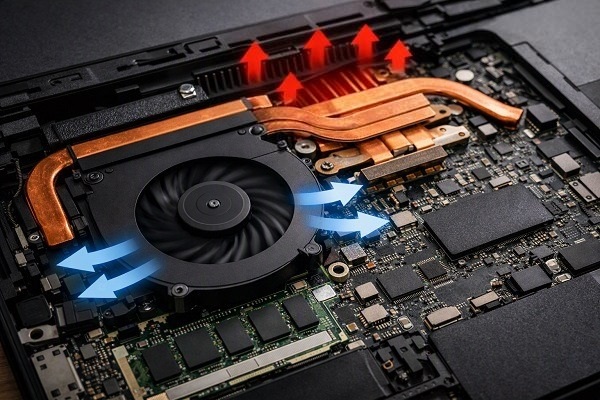
The **heat sink** absorbs heat from the processor or graphics chip and spreads it across a larger surface area.
**Heat pipes** transfer heat from hot components toward the cooling area. These sealed pipes contain a small amount of working fluid that helps move thermal energy efficiently.
**Cooling fans** pull air through the laptop and move heated air away from the internal components.
**Vents** allow cool air to enter and warm air to leave the chassis.
Some newer laptops also use specially designed vapor chambers or more advanced cooling structures to distribute heat across a wider area.
How Heat Pipes Work
Heat pipes are one of the most interesting parts of laptop cooling systems.
A heat pipe is a sealed tube containing a working fluid. When the section near the processor becomes hot, the fluid absorbs heat and turns into vapour. The vapour travels toward a cooler section of the pipe, where it releases heat and condenses back into liquid.
The liquid then moves back toward the hot area, allowing the process to repeat.
This continuous cycle helps transfer heat away from the CPU or GPU without requiring a large metal heat sink directly over the entire laptop.
What the Cooling Fan Actually Does
The fan's job is to move air, not directly cool the processor.
As the CPU and GPU generate heat, that heat is transferred into the heat sink and heat pipes. The fan then pushes air across the heated fins of the cooling system.
The moving air carries heat away from those fins and out through the laptop's exhaust vents.
This is why blocking the vents can cause temperatures to rise quickly.
Thermal Paste and Thermal Pads
Between a processor and its cooling hardware, manufacturers often use **thermal paste**. Its purpose is to fill tiny microscopic gaps between the surfaces so heat can transfer more efficiently.
Some other components may use **thermal pads** instead. These are soft, thermally conductive materials designed to bridge gaps between components and heat spreaders.
Without proper thermal contact, heat can build up at the component rather than moving efficiently into the cooling system.
How Laptop Cooling Changes During Heavy Work
Laptop cooling systems are designed to respond to changing workloads.
During light use, the fans may spin slowly or remain nearly silent. When the CPU or GPU becomes heavily loaded, temperatures increase and the system can automatically raise fan speed.
Modern laptops use temperature sensors and firmware or software controls to monitor thermal conditions and adjust cooling behaviour.
This is why your laptop may suddenly become louder when launching a game or performing a demanding task.
What Is Thermal Throttling?
When a component becomes too hot, the laptop may reduce its performance to control the temperature. This process is called **thermal throttling**.
For example, a processor may temporarily lower its clock speed or power consumption when temperatures approach its thermal limits.
Thermal throttling is essentially a protective mechanism. It may reduce performance, but it helps prevent temperatures from continuing to rise beyond safe operating conditions.
Why Gaming Laptops Need Bigger Cooling Systems
Gaming laptops typically use more powerful CPUs and dedicated GPUs than basic productivity laptops.
More processing power generally means more heat, especially during demanding games or rendering workloads. As a result, gaming laptops often have larger fans, multiple heat pipes, larger heat sinks, additional ventilation, or vapor-chamber cooling.
Some high-performance models also separate or partially isolate CPU and GPU cooling paths to improve thermal management.
Why Laptop Placement Matters
The surface underneath a laptop can affect cooling.
Using a laptop on a hard, flat surface generally provides better airflow than placing it on a bed, blanket, or soft fabric. Soft surfaces can partially block ventilation openings and restrict the movement of air.
A laptop stand can sometimes improve airflow by raising the chassis and giving the intake vents more space.
Dust and Cooling Performance
Dust can accumulate inside the cooling system over time. When dust covers fan blades, air vents, or heat-sink fins, airflow can become less effective.
This can cause the fans to work harder while temperatures remain higher than usual.
Keeping ventilation areas clean and maintaining the laptop according to the manufacturer's recommendations can help preserve cooling performance.
Why Fan Noise Changes
Laptop fan noise is usually related to workload and temperature.
A quiet fan does not necessarily mean the laptop is cooler, and a loud fan does not automatically mean something is wrong. During heavy workloads, louder fan operation can simply mean the cooling system is actively removing more heat.
Persistent unusual noise, sudden performance drops, or abnormal temperatures may indicate that the cooling system needs attention.
The Role of Software in Cooling
Cooling is not controlled by hardware alone. Operating-system power settings, laptop manufacturer utilities, and firmware can influence how aggressively the CPU and GPU use power and how quickly fans respond.
Performance modes may allow the system to use more power for longer periods, which can increase heat and fan noise. Battery-saving modes generally reduce power consumption, which can also reduce heat generation.
Why Good Cooling Matters
Effective cooling helps a laptop maintain stable performance while reducing the risk of excessive thermal stress.
It is particularly important during long workloads such as gaming, software development, video editing, 3D work, and other processor-intensive tasks.
A well-designed cooling system does not eliminate heat. Instead, it continuously transfers that heat away from sensitive components and manages it within acceptable limits.
The Bottom Line
Laptop cooling is a coordinated system involving heat sinks, heat pipes or vapor chambers, thermal interface materials, fans, vents, sensors, and software controls.
The basic process is straightforward: **components generate heat, thermal hardware transfers that heat away, fans move air across the cooling surfaces, and warm air leaves the laptop.**
Understanding how this system works also explains why airflow, clean vents, proper placement, and sensible workload management can make a meaningful difference to laptop performance and everyday reliability.